Automating Your Life with ChatGPT Tasks: A Complete Guide
How to Turn ChatGPT Into Your Personal AI Assistant
Ever wished you had a personal assistant who could handle routine tasks, send you reminders, and keep you organized? With ChatGPT's new Tasks feature, that's now possible. Here's how to transform ChatGPT from a chatbot into your automated digital helper that works even when you're offline.
Understanding Tasks: The Game-Changer
Tasks is ChatGPT's first venture into asynchronous processing - meaning it can now work for you in the background, executing commands at specified times without you being present in the chat. This might sound simple, but it's revolutionary: for the first time, an AI can autonomously handle recurring tasks on your behalf.
Getting Started: Setting Up Your First Task
Let's walk through creating a practical task that many of us could use: getting weekly meal prep recipes. Here's exactly how to set it up:
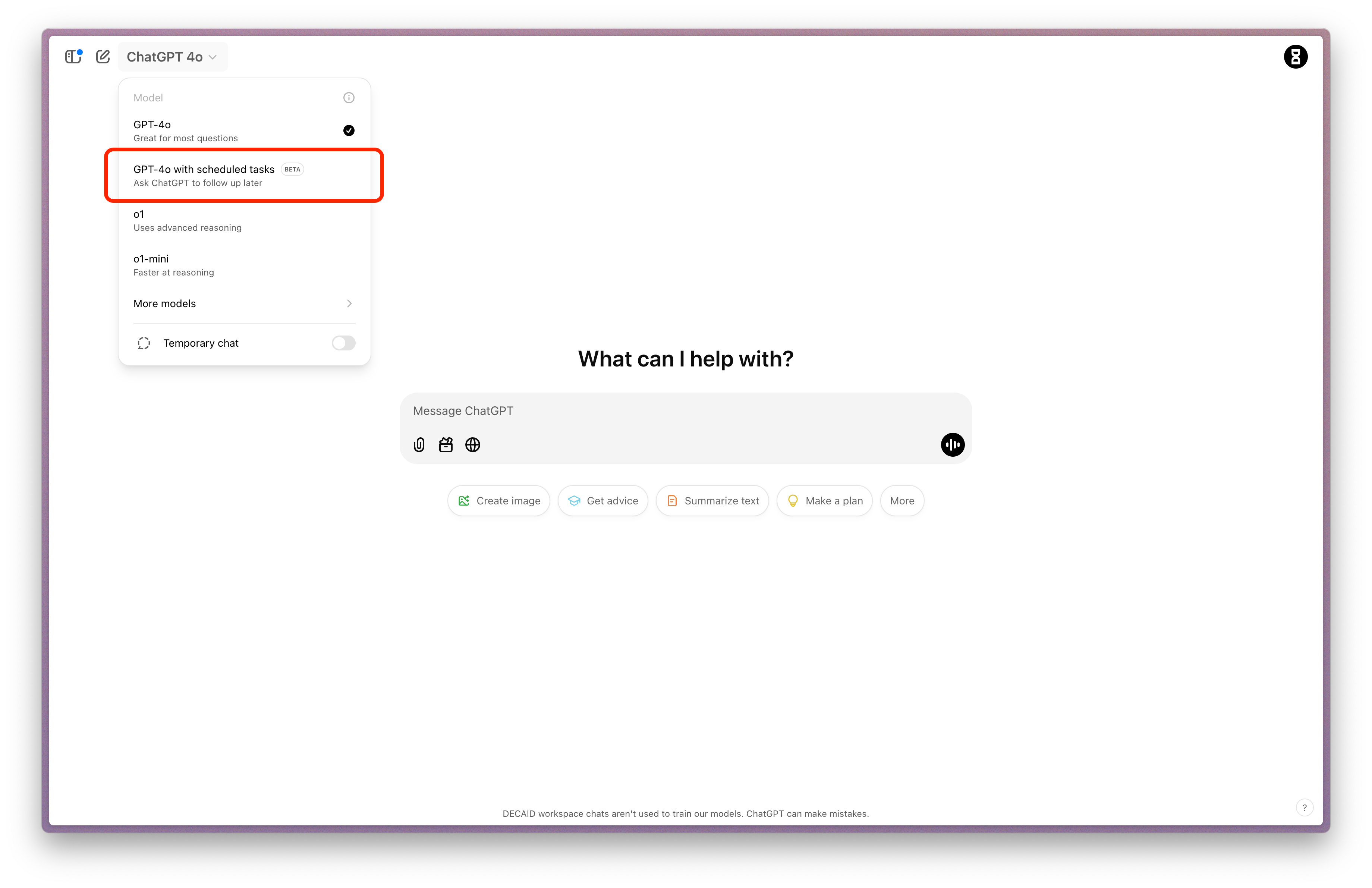
In ChatGPT, select "GPT-4o with scheduled tasks" from the model picker

Screenshot of the model selection Write your detailed prompt. Here's one we've tested and refined:

Screenshot of our prompt and the successful setup of the task
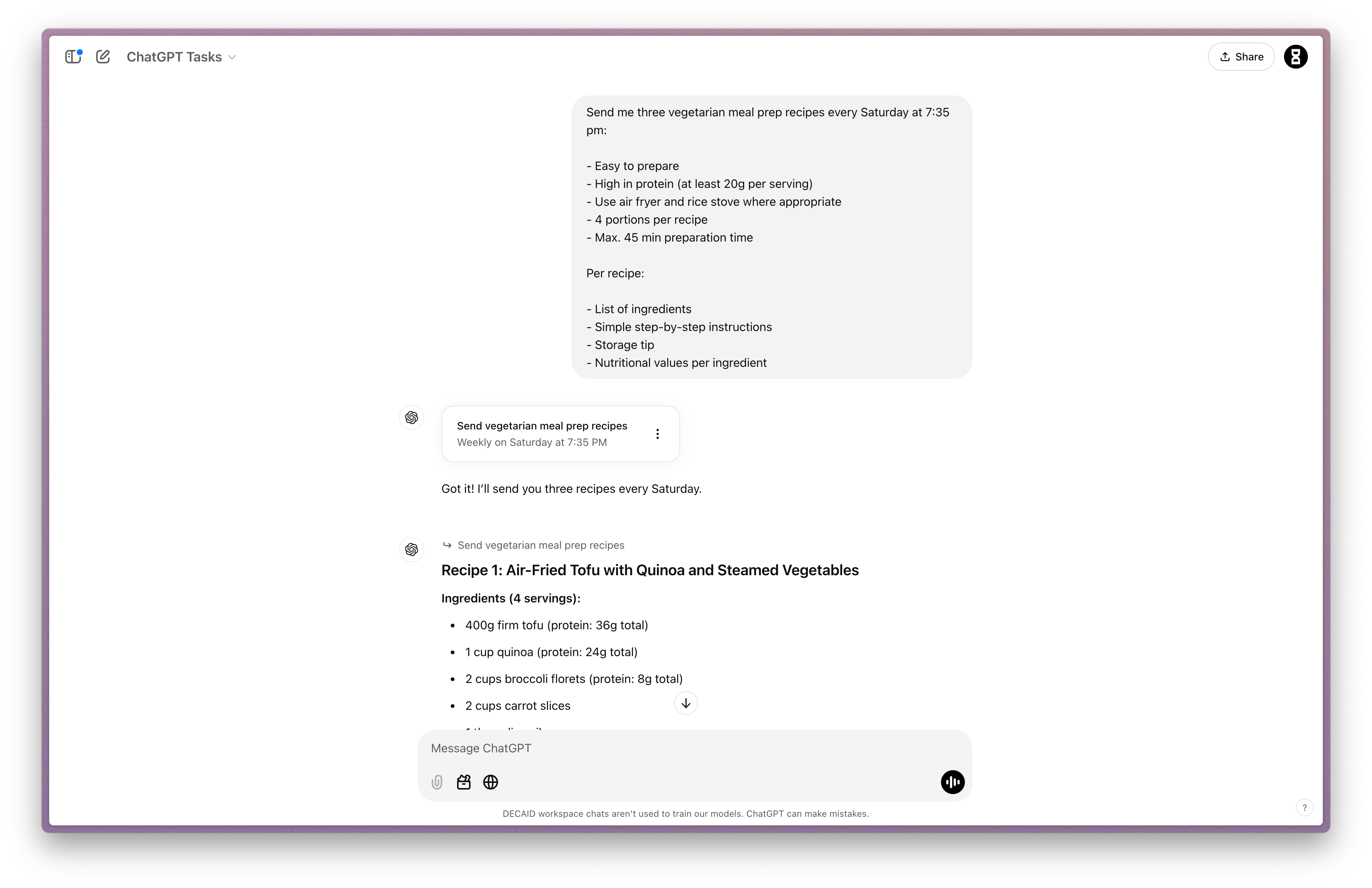
ChatGPT will confirm the task setup and schedule
To manage your tasks later, click your profile picture and select "Tasks"
Creative Ways to Use Tasks
Here are some powerful applications we've tested:
Learning & Development:
Daily language learning prompts at your preferred study time
Custom coding challenges for interview prep
Weekly quiz questions in your field of expertise
Health & Fitness:
Personalized 15-minute workout plans every morning
Daily meditation prompts
Healthy snack suggestions for your typical energy slump time
Information & Updates:
AI news summaries twice daily
Stock price checks and analysis every morning
Weather forecasts for your location
Creative Projects:
Weekly writing prompts for your blog
Daily DALL-E image generation based on themes you specify
Regular creative writing exercises or story continuations
Pro Tips for Effective Task Setup
Do:
Be specific about timing and frequency
Include all requirements in your initial prompt
Start with a test run for one-time tasks before setting up recurring ones
Avoid:
Setting too many similar tasks that might overlap
Creating tasks without clear output formats
Managing Your Tasks
Once you've set up tasks, you can easily manage them through the Tasks page:
Click your profile picture in the top right
Select "Tasks" from the dropdown menu
Here you can view, edit, pause, or delete any scheduled tasks
Time-Saving Success
In our testing, Tasks has saved users an average of 1-2 hours per week on routine activities. The key is starting with one or two well-defined tasks and gradually expanding as you get comfortable with the system.
Share Your Experience!
We'd love to hear how you're using ChatGPT Tasks! Share in the comments:
What tasks have you automated?
How much time has it saved you?
What creative applications have you discovered?
Remember: Tasks is currently in beta for Plus, Pro, and Teams users, with plans to roll out to all ChatGPT users soon. Start small, experiment often, and let the AI handle the routine while you focus on what matters most.